Gyazo: 23.6 million accounts and 490 million image records through an upload server
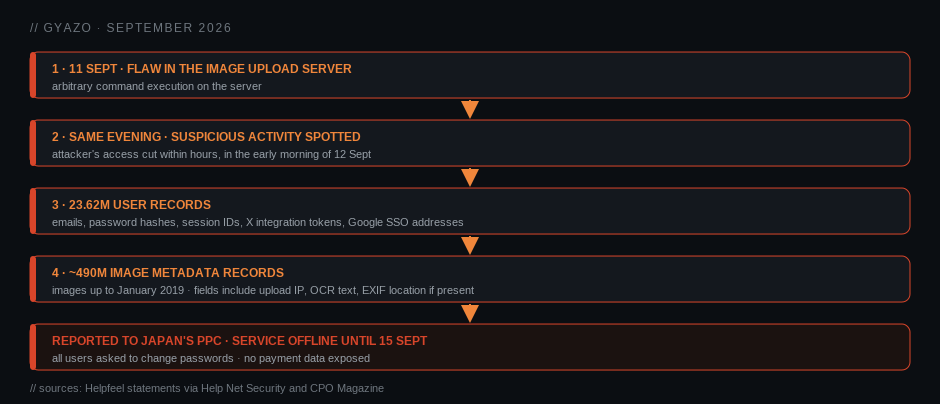
On 11 September someone exploited a flaw in the server that accepts image uploads at Gyazo and ran arbitrary commands on it. That same evening Helpfeel, Gyazo's Japanese owner, spotted suspicious activity and cut the attacker off within hours. By then the attacker had taken 23.62 million user records and about 490 million image metadata records. Gyazo is a popular screenshot tool, and that is what changes the weight of this leak.
Context and legality. This is educational material based on Helpfeel's statements as reported by Help Net Security and CPO Magazine. We do not know the type of vulnerability exploited, because the company has not disclosed it. Testing systems you do not own is legal only with the owner's written authorisation.
What happened
According to Helpfeel, the vulnerability in the upload server allowed arbitrary command execution. CPO Magazine reports that the attacker deployed malware on the server. Detection came on the evening of 11 September, and access was cut early in the morning of 12 September. Gyazo disabled image uploading and viewing and came back online on 15 September. The incident was reported to Japan's Personal Information Protection Commission (PPC).
What leaked
User records contained names, email addresses, password hashes, user and device IDs, session IDs, X integration tokens, Google sign-in email addresses, profile data, and plan and billing status. There were no payment card details. The number of records is not the number of people, since one person can have several records.
The image metadata covers files uploaded up to January 2019. It includes, among other things, the image ID, the IP address it was uploaded from, the User-Agent header, title, source URL, text read by OCR, EXIF location (if present) and hashed passphrases for private images. According to Help Net Security, the full set of these fields covers about 2.4 million images. The attacker also obtained a list of private images, and Helpfeel cannot rule out that some of them were viewed.
Three things that are easy to miss
Tokens and sessions are not passwords. Changing your password does not automatically invalidate a stolen session ID or an X integration token. Unless Gyazo revoked them on its side, signing out of all sessions and disconnecting the integration matters more than a new password.
Hashes can be cracked. Paul Bischoff of Comparitech says hashed passwords cannot feasibly be reverted to plain text. That holds for strong passwords and a good algorithm. A weak password, especially one reused elsewhere, falls to offline cracking faster than many users expect. Helpfeel has not said which algorithm it used.
OCR from screenshots is a separate problem. People take screenshots of terminals, admin panels, configuration and chats. Text read from such images can include API keys, internal system addresses and customer data. A leak of OCR metadata is in practice a searchable index of what people had on their screens.
Why the upload server
A server that accepts files from anyone is one of the most frequently attacked parts of an application: it parses formats, processes images and writes to disk. Seemant Sehgal of BreachLock notes that this server sat next to a database holding half a billion metadata records, which suggests a lack of internal segmentation. The upload flaw gave command execution, and the missing boundaries gave access to the data. We described the same pattern in our review of recent RCE flaws.
What we still do not know
Helpfeel has not disclosed the type of vulnerability or the algorithm it used to hash passwords. It is not known whether it revoked all sessions and integration tokens after the incident, or whether the attacker took the image files themselves or only their metadata and the list of private images. According to CPO Magazine, nobody has claimed the attack and there has been no ransom demand. So it is unclear what the attacker intends to do with the data, and it is sensible to assume it may surface somewhere later.
What to do
As a user: change your Gyazo password and the password everywhere you reused it, sign out of all sessions and reconnect the X integration from scratch. If your screenshots may have contained keys or passwords, change those too.
As a company:
- Find out what your people use. Screenshot and cloud clipboard tools are SaaS that process company data, often outside IT's control.
- Treat screenshots as data. Decide which tools are allowed, and scan them for secrets where you can.
- Rotate secrets that may have ended up in a screenshot. If someone kept console screenshots with keys in Gyazo, those keys must be treated as exposed.
- Isolate services that accept files. A separate environment, minimal privileges and no direct path to databases with user data.
What this means
Gyazo is not critical infrastructure, but it shows well how a "quick screenshot" tool becomes a store of company data. If you want to check whether your services that accept files from users can withstand attacks like this, that is the scope of our application penetration testing. Book a consultation.
Sources: Help Net Security · CPO Magazine