BigCommerce and the Ribon app: how a stolen app key exposed shopper data
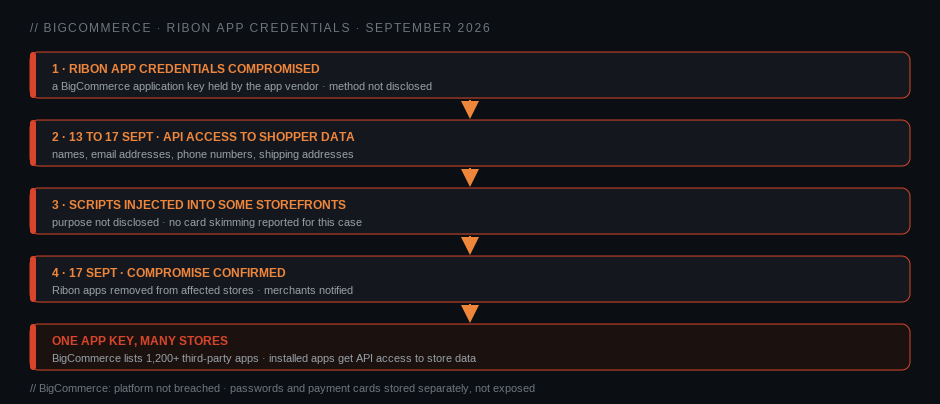
From 13 to 17 September someone used compromised credentials of the Ribon app to read shopper data in stores running on BigCommerce and to inject scripts into some storefronts. On 17 September BigCommerce confirmed the compromise and removed the app from affected stores. The platform itself, the company stresses, was not breached. It did not need to be, because the attacker held a key that opened store data through a legitimate route.
Context and legality. This is educational material based on reporting by BleepingComputer and SC Media and information shared by one of the affected merchants. The scale of the incident and how the credentials were compromised have not been disclosed. Testing systems you do not own is legal only with the owner's written authorisation.
What happened
Ribon and Ribon 1.5 are shopping experience optimisation apps owned by Be A Part Of, a Fastr company. Like every app in the BigCommerce marketplace, they get API access to store data when installed. According to UK merchant Master of Malt, the attackers compromised a BigCommerce application key held by Ribon. How, nobody knows.
For five days the key was used to pull shopper data: full names, email addresses, phone numbers and shipping addresses. BigCommerce stores passwords and payment card data separately, and according to the company they were not exposed. The attackers also injected malicious scripts into "a small number" of storefronts. It is not known what those scripts did, and reporting on this incident does not mention card skimming.
BigCommerce uninstalled the Ribon apps from affected stores, notified merchants and handed logs to the developer's investigation. Master of Malt reported the incident to the UK ICO and suggests it could affect hundreds of other stores. Nobody has confirmed that number, but law firms are already looking for claimants.
An app key as a pass
The key lesson concerns the integration model, not BigCommerce itself. A marketplace app receives the permissions it asked for at installation, and usually nobody reviews them later. If an app can read customer data and change storefront scripts, its key is effectively an admin key for those two areas, only stored on another company's server. One compromised vendor means access to every store that installed it. BigCommerce lists more than 1,200 apps and integrations in its ecosystem.
Scripts in the storefront
Permission to inject scripts is a separate risk. The same mechanism that lets an app add a widget lets it add a script that reads data from the checkout form. BleepingComputer and SC Media recall the 2024 ZAGG incident, where payment-skimming code reached a store through the FreshClick app. There is no information about such behaviour in the Ribon case, but the mere fact that the attacker could change storefront code should prompt merchants to check what actually runs on their pages.
If Ribon was installed in your store
For a merchant this is not someone else's problem. The store is the controller of its customers' data, while BigCommerce and the app developer process it on the store's behalf. If you received a notice or had the Ribon app installed, the order of work looks like this. Check in the admin panel that the app is uninstalled and that no tokens or keys are left behind. Review the scripts added to your storefront, especially any you do not recognise, and compare them with a copy from before 13 September. Establish whose data could have been pulled and assess whether the breach has to be reported to the supervisory authority. Under GDPR you have 72 hours from becoming aware of it, unless the breach is unlikely to pose a risk to your customers. Master of Malt reported the incident to the UK ICO. In Poland the competent authority is the UODO President.
How to defend
- Review installed apps and their permissions. Remove the ones you do not use. For the rest, check whether they really need access to customer data and storefront scripts.
- Monitor scripts on checkout pages. A CSP policy, an allowlist of scripts and change detection, especially on cart and payment pages.
- Require basic security from app vendors. How they store keys, whether they rotate them, how quickly they will notify you of an incident. This is part of supply chain risk management under NIS2.
- Rotate keys after every vendor incident. Uninstalling the app is a good first step, but keys and tokens have to be revoked even if you later return to the same app.
- Prepare to notify customers. Contact details and addresses are enough for very convincing phishing "about your order".
What this means
A platform does not have to be breached for its customers' data to leak. One vendor with a key is enough. The same supply chain pattern shows up in the October retail incidents we cover in our piece on Albert Heijn and H&M. If you run an online store and want to check what your integrations could do with your data, that is the scope of our application penetration testing. Book a consultation.
Sources: BleepingComputer · SC Media