GDID: the Windows identifier a VPN won't hide
In July 2026 a case swept through the tech press that reopened the debate about privacy in Windows. Federal filings tied to the arrest of an alleged member of the Scattered Spider group indicated that investigators had linked the suspect's activity to a specific machine using the GDID - Global Device Identifier. The suspect used a VPN, cycled through IP addresses and connected via remote desktops - and yet the machine stayed recognisable. As one report put it: "The VPN hid the network path. It did not hide the machine."
Context. This is educational material about privacy and device-level attribution. It describes a mechanism publicly documented in press reporting, to help readers understand the limits of popular "anonymising" tools - not to support evading lawful accountability.
What GDID is
The Global Device Identifier is - per wording attributed to Microsoft - "a persistent, device-level identifier that uniquely marks an installation of Windows." Its key properties, according to available reporting:
- it is persistent - it survives reboots and network changes;
- it is tied to the OS installation, not the hardware - a new GDID appears only after a fresh Windows reinstall;
- it originates within the Connected Devices Platform (the layer behind features such as Phone Link); signing in with a Microsoft Account strengthens the linkage (a device identifier is then assigned and stored in the registry).
In other words: it is a stable "serial number" for your Windows installation that system services report back to Microsoft in the background.
How it tracks
Background services - diagnostic telemetry, peer-to-peer updates, account-linked features - transmit the GDID to Microsoft's servers. Because the identifier is constant, the same machine looks the same regardless of which IP address it happens to be leaving the network through at any given moment.
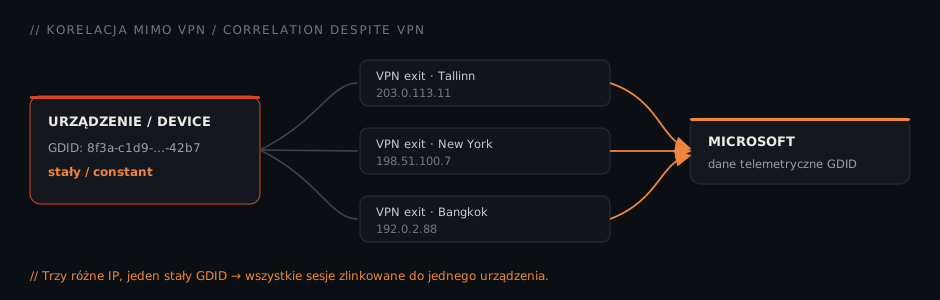
From there it is "ordinary" correlation: given timestamps of activity tied to a GDID, investigators line them up against connection logs, logins to social-media or gaming accounts and data from other sources. In the reported case that correlation spanned activity across several countries over months and led to an airport arrest and extradition.
Why a VPN doesn't help
The key observation is architectural, not a matter of "configuration":
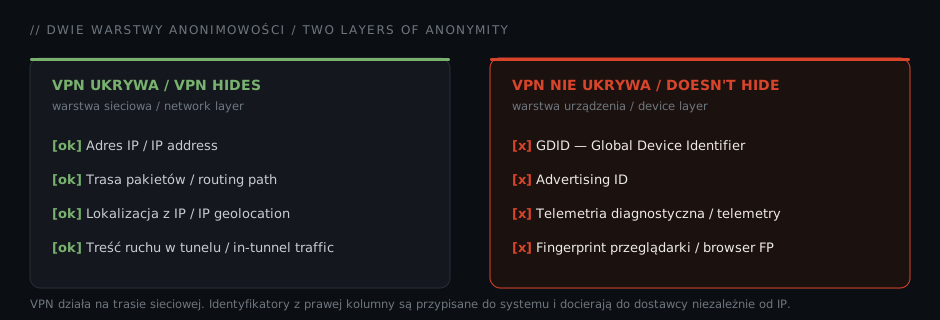
A VPN is a network tool. It changes your apparent IP address and encrypts traffic inside the tunnel - it hides the route. GDID lives a floor below, at the operating-system level, and reaches the vendor regardless of the network path. An investigator does not need to "break" the VPN; it is enough to line up Microsoft's data about GDID activity with other timestamps.
The same logic applies to the other device-layer identifiers: the advertising ID, diagnostic telemetry or the browser fingerprint (canvas, WebGL, fonts, timezone). None of them disappears when you switch a VPN on, because none of them is an attribute of the network.
What you can (and can't) do about it
According to reporting, there is no switch that fully disables GDID - blocking it entirely breaks system activation and Store (UWP) apps. Settings only let you limit the scope of what is captured:
- Settings → Privacy & security → Diagnostics & feedback - turn off optional diagnostic data.
- Settings → Privacy & security → Recommendations & offers - disable personalised ads and launch tracking.
- Settings → Privacy & security → Search - turn off cloud content search.
- Consider a local account instead of a Microsoft Account; disable the advertising ID separately.
Reinstalling the OS produces a new GDID - but that is an extreme measure, not everyday hygiene. The honest takeaway: these settings reduce the volume of data transmitted, but they do not make the device anonymous.
A transparency gap
Beyond the technology itself, reporting points to a governance problem: no published policy setting out exactly when GDID data is shared, no consumer opt-out, and no transparency report. For an organisation this is not trivia - it is a real question for a data-protection officer.
What this means for organisations
Three practical conclusions:
- Attribution has moved to the endpoint. Device telemetry is richer than many teams assume - which changes the risk model for remote work, BYOD and general-purpose workstations.
- A VPN is not "privacy." It is a network tool. Treating it as a blanket layer of anonymity is a mistake auditors and DPOs should note.
- Map your data flows. Awareness of what telemetry your systems and vendors emit maps directly onto the risk-management and supply-chain requirements of NIS2 / KSC - including a DPIA where one is required.
For offensive teams, in turn, it is a reminder that device fingerprinting can be a more effective deanonymisation vector than analysing network traffic alone - and it deserves a place in both testing and threat modelling.
Summary
Anonymity is a layered model. A VPN addresses the network layer; GDID, telemetry and fingerprinting belong to the device layer - and that is increasingly where real identification happens. No single tool "solves privacy"; what matters is a coherent view of the whole endpoint.
Want to understand what telemetry and which identifiers your systems actually emit - and what that means for compliance? Book a consultation.
Sources: Windows Latest · Cybernews · Tom's Hardware · IBTimes UK